Product
Introducing the Orbit Notetaker: Meeting Intelligence That Puts Agents to Work
Meeting and prospect intelligence with agent action. A notetaker that remembers, maps every call to the right person, and starts the work when you hang up. Powered by ClioIQ.
Every notetaker today can tell you what was said on a call. Very few do anything with it.
You finish a sales call, and a neat summary lands in your inbox. Then the real work starts: update the CRM, write the follow-up, remind someone to send the proposal, brief the person running onboarding. The notetaker remembered the call. You still have to act on it.
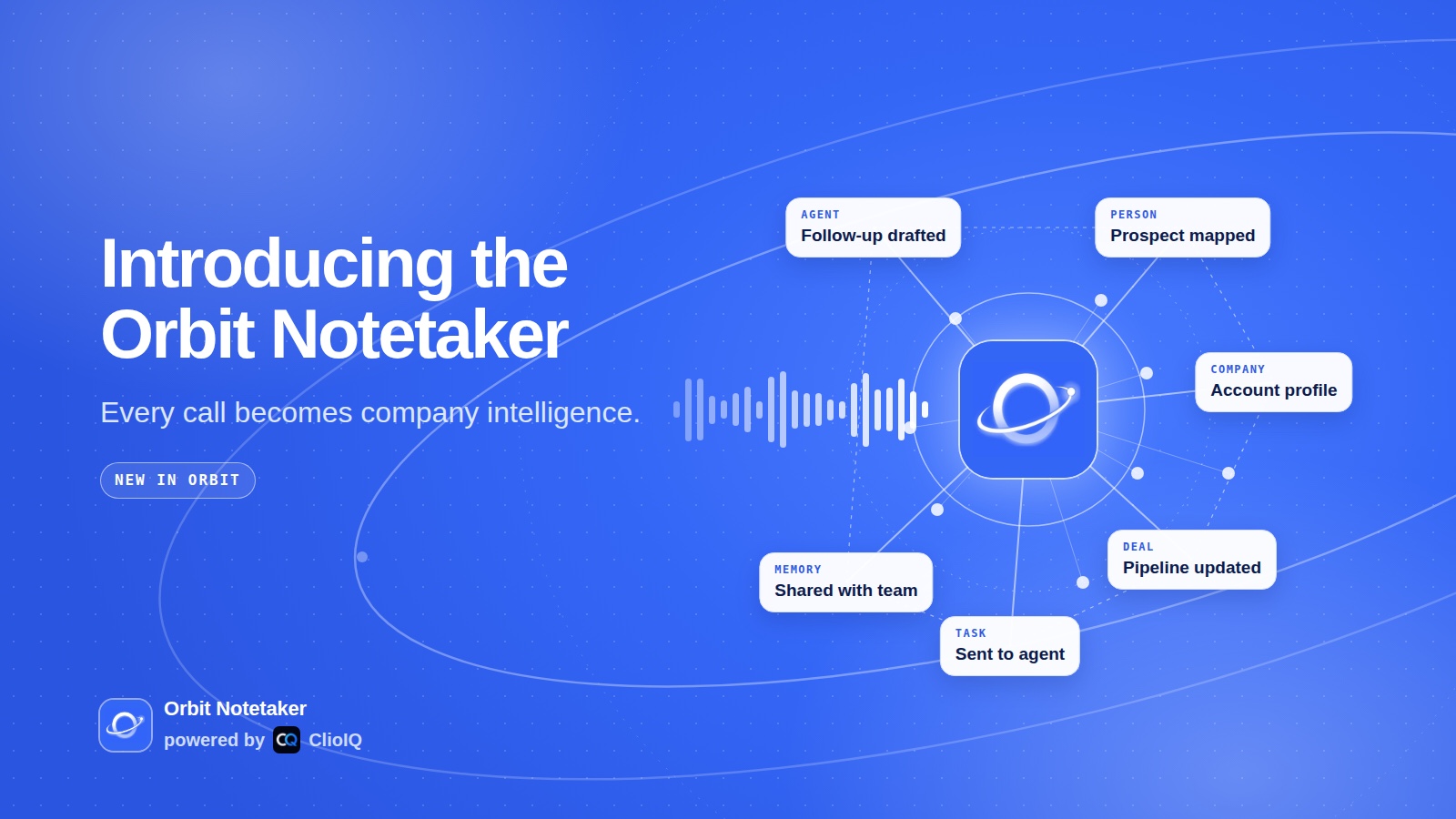
Today we are launching the Orbit Notetaker, and it is built to close that gap. It is meeting and prospect intelligence with agent action. It joins your calls, understands them, remembers them, maps everything to the right person, and hands the tasks to the right agent. When you hang up, the work has already started.
Powered by ClioIQ, the sales and revenue intelligence platform from CognixAI Hub.
Why a notetaker should do more than summarize
A summary is a record. A record is useful, but it does not move a deal forward or onboard a customer. The value of a call is in what happens after it, and that is where most teams lose time.
Here is the usual pattern after a good call:
- The notes sit in one tool and the customer record sits in another.
- The follow-up gets written hours later, from memory.
- Action items live in a summary nobody reopens.
- The next person who talks to that customer starts from zero.
The Orbit Notetaker treats every call as actionable intelligence, not just conversations.
How it works
You turn it on once and choose when it joins: every call, only calls with people outside your company, or only the ones you host. It works on Zoom, Google Meet and Microsoft Teams (Zoom after a one-time connection of your Zoom account), and joins as your own notetaker, named after you. You can skip any single meeting.
After the call, three things happen.
1. Intelligence maps to the right person
Every participant is matched to the right person in your Orbit CRM by email, automatically. If someone is new or the match is missing, you link them by hand in one click. Each person's card gets a meeting notes and intelligence section, so the next time anyone opens that contact, the history of every call is right there.
That is prospect intelligence that builds itself. You never have to copy a summary into a CRM again.
2. Tasks go to the right agent
The notetaker pulls out action items, with an owner and a due date where they were said. Next steps are filled in from the call and your calendar. Each task can go to a person on your team or straight to an agent: Orbie, your AI CMO, or any agent you choose as the action agent. A task can also wait for a scheduled agent's next run.
3. Work starts when you hang up
This is the part no ordinary notetaker does. The action agent picks up the tasks from the call and gets going: drafting the follow-up, researching the company you just spoke to, updating the pipeline or preparing what you promised to send. By default it runs when you click, so you stay in control. Switch it to automatic and it starts the moment the call ends.
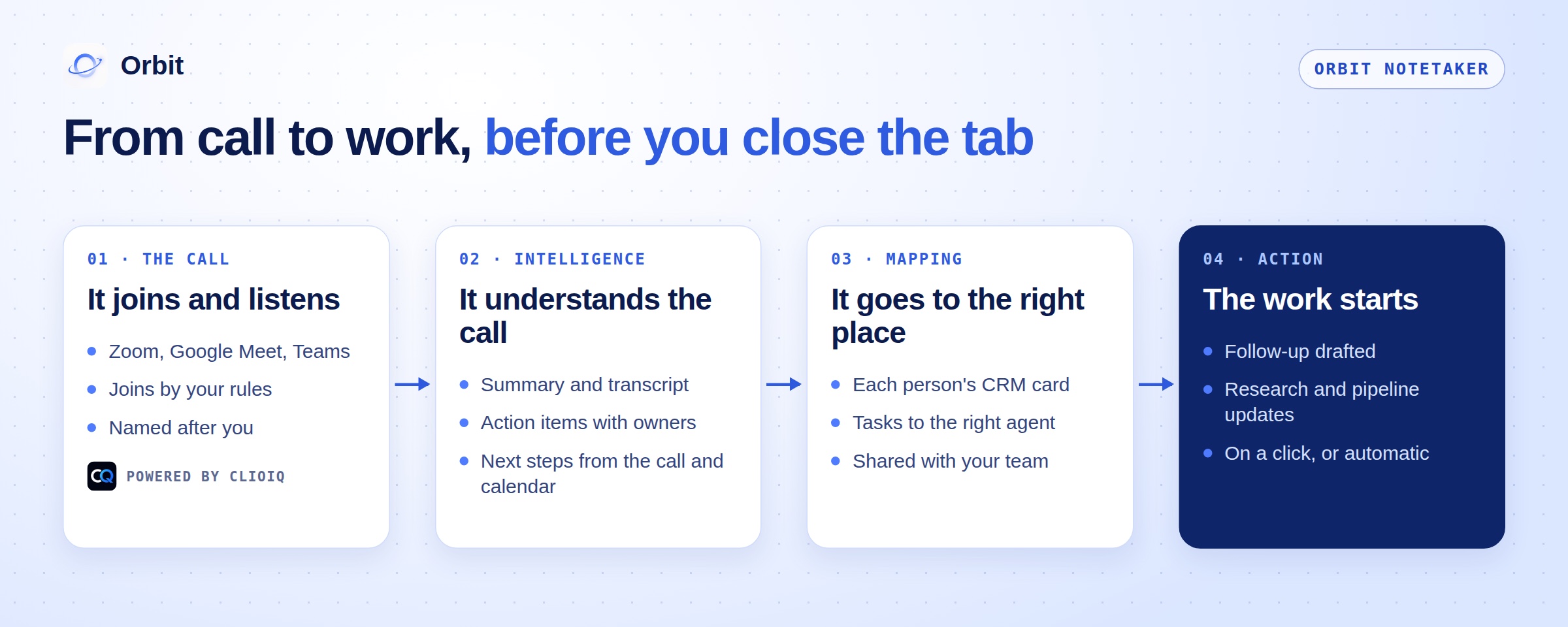
You also get the summary, the full transcript with one-click copy, and a share link for the summary that you can send to anyone who missed the call.
Built for sales and operations
The Orbit Notetaker was designed for two jobs that run on calls every day.
Sales. Discovery calls, demos and follow-ups feed straight into the CRM and the pipeline. The follow-up is drafted before you have closed the tab, every prospect's history sits on their card, and your outreach agents know what was said, so the next message picks up where the call left off.
Operations. Onboarding calls, client check-ins, partner meetings and internal planning become tasks with owners. Commitments made on a call turn into work for the right person or agent, and a daily plan built from your calendar shows what needs doing today.
For a growth team, that closes the loop. Your agents find the customers and start the conversations, you take the call, and the notetaker hands the next step back to the agents.
One notetaker your whole team shares
Most notetakers belong to one person. The calls you record live in your account, and sharing them means forwarding notes or adding seats one by one.
The Orbit Notetaker is built for teams. Calls recorded by your team are shared inside your workspace, so a sales rep's discovery call is there for the account manager who takes over, and an onboarding call is there for whoever runs support. You choose who on the team gets the notetaker, and who receives the notes after each call.
Your agents share it too. Give an agent the meeting notes tool and it can read and search your team's calls, so a proposal agent can quote what the customer actually asked for, and an outreach agent can follow up on a promise made in a meeting. That is what one shared memory means in practice, and it is the idea Orbit was built on from the start.
What powers it: ClioIQ
ClioIQ listens to sales calls and turns them into intelligence. It records and transcribes each call in your team's language, and builds summaries, minutes and action items in that language when the call ends. Each call also comes with conversation intelligence: talk ratio, sentiment, objections and open questions.
In the Orbit Notetaker, ClioIQ is the engine underneath: it joins the call, captures it and produces the intelligence. Orbit is everything after: the CRM mapping, the shared memory, the tasks and the agents that act on them. That is why the product is called the Orbit Notetaker, powered by ClioIQ.
"A notetaker is only as useful as what happens after the call. Orbit's agents turn every meeting into work, and we're proud that ClioIQ is the engine underneath."
Subhrajyoti Das, CEO, CognixAI Hub
Privacy and control
Recording calls is a responsibility, so control is built in.
- You decide when it joins. By rule, by meeting, or not at all.
- You decide who sees the notes. Off, only the person who ran the call, or them plus the internal attendees.
- You decide when agents act. Suggestions by default, automatic only if you turn it on.
- Everyone on the call can see the notetaker. It joins as a participant whose name says it is a notetaker.
- You can delete any call. And if someone asks to be erased, there is a form for that.
Share links show the summary only, expire after 30 days and can be turned off. Transcripts always need a login. Let participants know the call is recorded, as your local rules require.
Who it is for
Sales teams and founders who sell. Every call becomes a CRM update, a follow-up and a next step, without the admin.
Marketing and GTM teams. What customers say on calls feeds the memory your content and outreach agents work from, so messaging matches what buyers actually say.
Agencies. Client calls map to the client's own workspace in agency mode, with the client's own agents, results and people. Commitments made to a client on Tuesday become tasks for that client's agents the same day.
Operations and customer success. Onboarding and check-in calls become owned tasks, and the next person on the account starts with the full history.
Get started
The Orbit Notetaker lives in Orbit under Connectors. Turn on the meeting notetaker, choose when it joins and who gets the notes, and pick your action agent. Your next call is the first one that turns into work on its own.
If you are new to Orbit, start free at orbitagents.com: enter your website, pick an agent, and add the notetaker when you are ready for your agents to hear your calls too.
Frequently asked questions
- What is the Orbit Notetaker?
- It is a meeting notetaker built into Orbit and powered by ClioIQ. It joins your calls, writes the summary, transcript and action items, maps everything to the right person in your CRM, and hands tasks to the right agent so work starts when the call ends.
- Which meeting apps does it work with?
- Zoom, Google Meet and Microsoft Teams (Zoom after a one-time connection of your Zoom account). You can let it join automatically by rule, for example only calls with people outside your company, or skip a single meeting.
- What is ClioIQ?
- ClioIQ is a sales and revenue intelligence platform from CognixAI Hub. It records, transcribes and analyzes sales calls on Zoom, Google Meet and Microsoft Teams, and turns them into summaries, action items and conversation intelligence.
- Can my whole team use the same notetaker?
- Yes. Calls recorded by your team are shared inside your workspace, and agents that have the meeting notes tool can read them, so nobody has to forward notes or re-explain a call.
- Will an agent act on a call without me?
- Only if you want it to. By default, next steps are suggestions and the action agent runs when you click. You can switch it to automatic.
Build your autonomous AI company
Orbit gives your AI clients shared memory, provisioned tools and agents that run like trained employees.
Get started free