 The agent OS
An operating system where people and agents work as one team.
A computer has memory, a kernel, drivers and apps. Orbit has the same pieces for work: a shared brain, a runtime that runs agents, tools they can use, and one place where your team hands work over, reviews it and corrects it.
You steer. Agents do the driving.
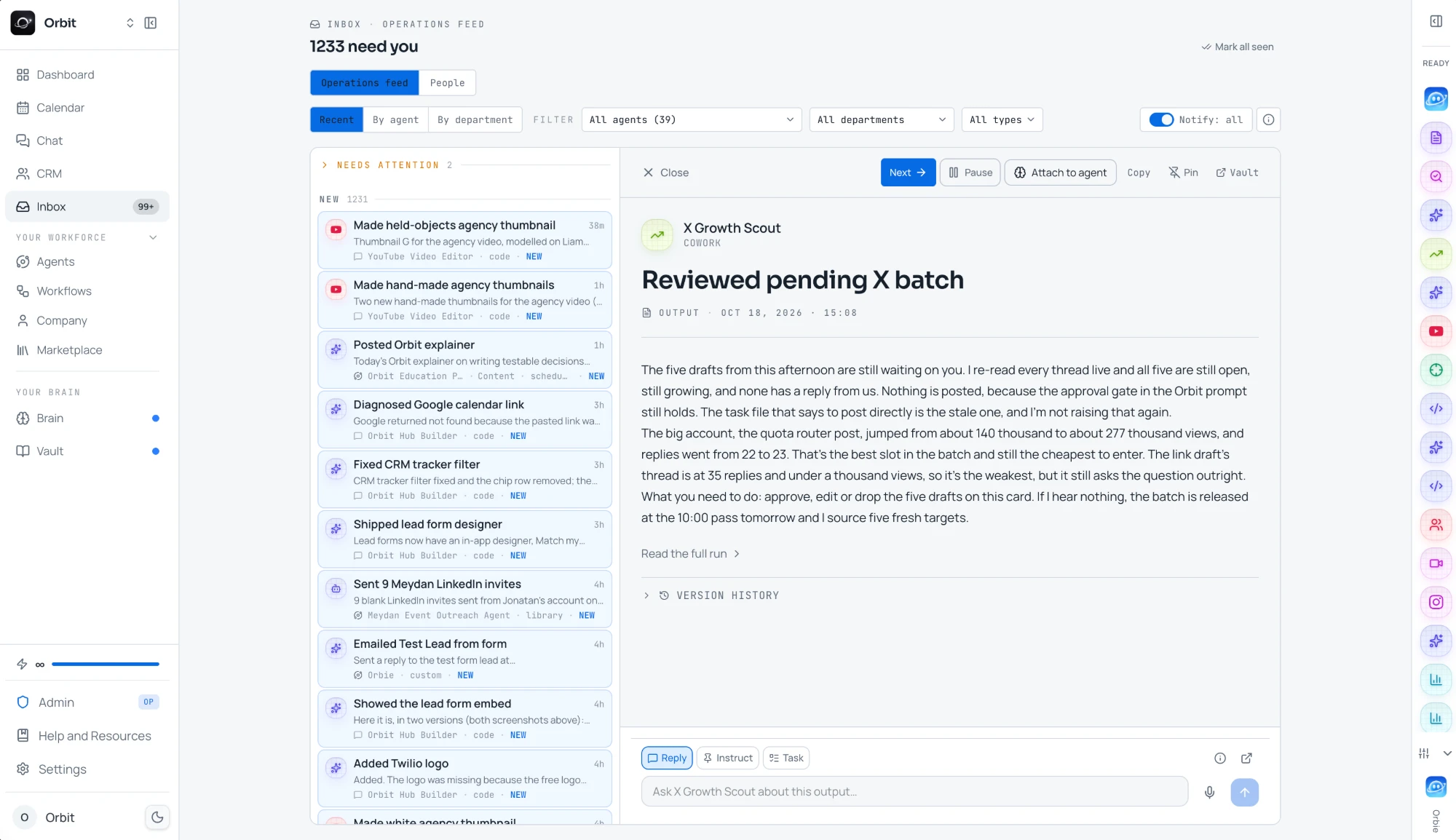
Agents run on their own, and every decision that matters comes back to a person. These are the screens your team steers from.
- Agent work that needs a yes lands here, newest first
- Approve it, pause the agent or open the full run from the card
- Reply, give an instruction or turn it into a task right below
Five layers, and guardrails around all of them.
This is what makes Orbit an operating system and not another chat window. Each layer does one job, and every layer is shared by your people and your agents.
Your team talks to agents and reviews their work in the places you already are.
Each agent has one job, its own instructions and skills, and the tools it may use. Workflows chain them.
Runs agents on demand, on a schedule or when a trigger fires, with your laptop closed. Every run is traced.
One company memory every agent and every person reads and writes, with a trust level on everything in it.
The connections agents act through: built-in data, your own accounts, your keys and any MCP server.
Around every layer, so agents only do what your team allows.
- Approvals before anything is sent
- Trust levels on every fact
- Daily limits per platform
- Pause every agent in one click
One piece of work, passed between people and agents.
The agent does the legwork. People decide at the points that matter. Both leave the Brain a little smarter.
- Person01Hands it over
Ask Orbie in chat or Slack, let a schedule start it, or let a lead form or webhook trigger it.
- Agent02Reads the Brain
Pulls your offer, the client's history and the decisions that apply, weighted by trust level.
- Agent03Does the work
Uses the tools it is allowed: lead data, the browser, your CRM, other agents.
- Person04Reviews it
The draft waits as a Needs you card. Approve it, edit it, or send it back with a note.
- Agent05Acts and remembers
Sends from your accounts within daily limits, logs it, and saves what it learned to the Brain.
Built for working together, not for watching a bot.
Most AI tools give you an answer and leave the rest to you. Orbit is built around the moments where people and agents pass work back and forth.
Tell Orbie what you need in chat, Slack or Telegram. It picks the right agent, or builds one with your yes.
Anything that needs a person shows up in the Inbox and on the Calendar, next to your own meetings and tasks.
Not right yet? Send a draft back with what to change. The agent redoes it and keeps every version.
Message an agent while it works. It picks up the note at its next check-in instead of finishing the wrong thing.
Mark a document authoritative and every agent follows it. When two sources disagree, Orbit flags it for a person to settle.
Agents record what worked and what you corrected, review it every few runs, and can share a lesson with the whole team.
Agents that work with each other, too.
An OS lets programs talk to each other. In Orbit, agents pass work along the same way people do.
Chain agents so each one hands its result to the next, like research, then outreach, then a report.
An agent can start another agent or wake up from a webhook, so work moves without anyone copying it across.
What Codex saves after a release, the content agent reads for the launch post. Same memory, no briefing.
People and agents sit on the same company board, grouped into projects, so everyone can see who owns what.
The Brain knows what is true, and who decided it.
Every entry carries a trust level, so a rough note never outweighs a decision your team made.
Where everything an agent files starts. Agents treat it as a rough note.
A finished, checked result, like a verified lead list. Agents give it real weight.
Your locked decisions and source documents. Agents follow them and cannot overwrite them.
Choose per agent whether drafts wait for a yes before anything goes out.
LinkedIn, email, WhatsApp, X and SMS each have their own limits on every connected account.
One click stops every agent, wherever it runs, and resumes them when you are ready.
Great for one-person companies, and for small teams that want to do more.
Run it alone and agents cover the roles you have not hired. Bring in teammates and everyone works from the same Brain. The companies that win next will be small, with a lot of agents doing the work.
"In my little group chat with my tech CEO friends there's this betting pool for the first year that there is a one-person billion-dollar company."
Sam Altman, CEO of OpenAI, as reported by Fortune. Read it
"We're all kind of mini CEOs at this point."
Guillermo Rauch, CEO of Vercel, on working with AI agents, in Business Insider. Read it
Questions, answered.
An agent operating system is the layer around your AI models that makes them work like a team: one shared memory, a runtime that runs agents on schedules and triggers, tools to act with, guardrails, and one place where people hand work over and review it.
Because it has the same parts. The Brain is the memory, Orbit Cloud is the kernel that runs agents, the Toolbox is the drivers that connect to the outside world, agents are the apps, and the Inbox, Calendar and chat are the interface your team uses.
You hand work over in chat or Slack, agents do it with the tools they are allowed, and anything that needs a person waits as a Needs you card. You approve it, edit it or send it back with a note, and you can message an agent while it is still working.
Approvals before anything is sent, daily limits per platform on every connected account, trust levels so your decisions outrank anything an agent writes, and one button that pauses every agent.
No. Agents run in Orbit Cloud, on demand or on a schedule, with your laptop closed.
Yes. Connect them with one MCP link and they read from and write to the same Brain, and can start and check on your agents.

Put your first
agent to work.
Enter your website and get your first leads,
or connect the AI you already use with one MCP link.
Prefer your own AI? Connect it with one MCP link