AI Explained
Context Engineering: The Skill That Replaced Prompt Engineering
Why the best AI agents win on what they see, and how to design it
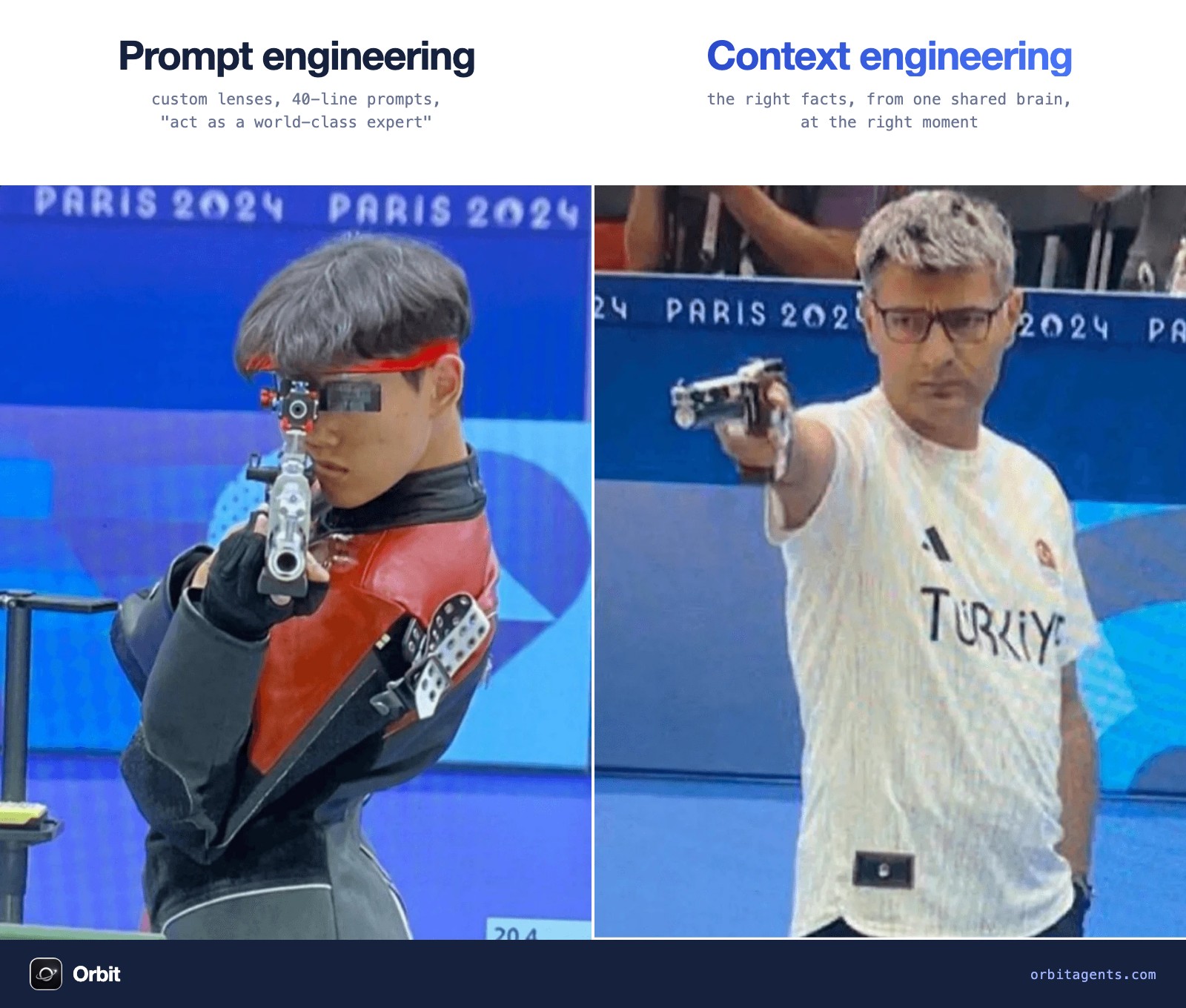
For two years everyone tried to get better at prompting. Magic words, 40-line system prompts, "act as a world-class expert".
Then agents arrived, and the question changed to this: what does the model need to see right now to get this step right?
That's context engineering. It's the reason two teams using the same model get completely different results.
What is context engineering?
Context engineering is designing everything an AI model sees before it acts: the instructions, the knowledge, the memory, the tools, and the results of its own work, so it has exactly what the next step needs and nothing more.
The term took off in June 2025. Shopify CEO Tobi Lütke wrote that he really likes "context engineering" over prompt engineering, because it describes the real skill: giving the model all the context it needs to plausibly solve the task. Days later, Andrej Karpathy called it "the delicate art and science of filling the context window with just the right information for the next step."
Anthropic's engineering team then put it plainly in Effective context engineering for AI agents: context "must be treated as a finite resource with diminishing marginal returns." The goal is the smallest set of high-signal tokens that gets the outcome you want.
A prompt is one input. Context is the whole environment the model works in.
Prompt engineering vs context engineering
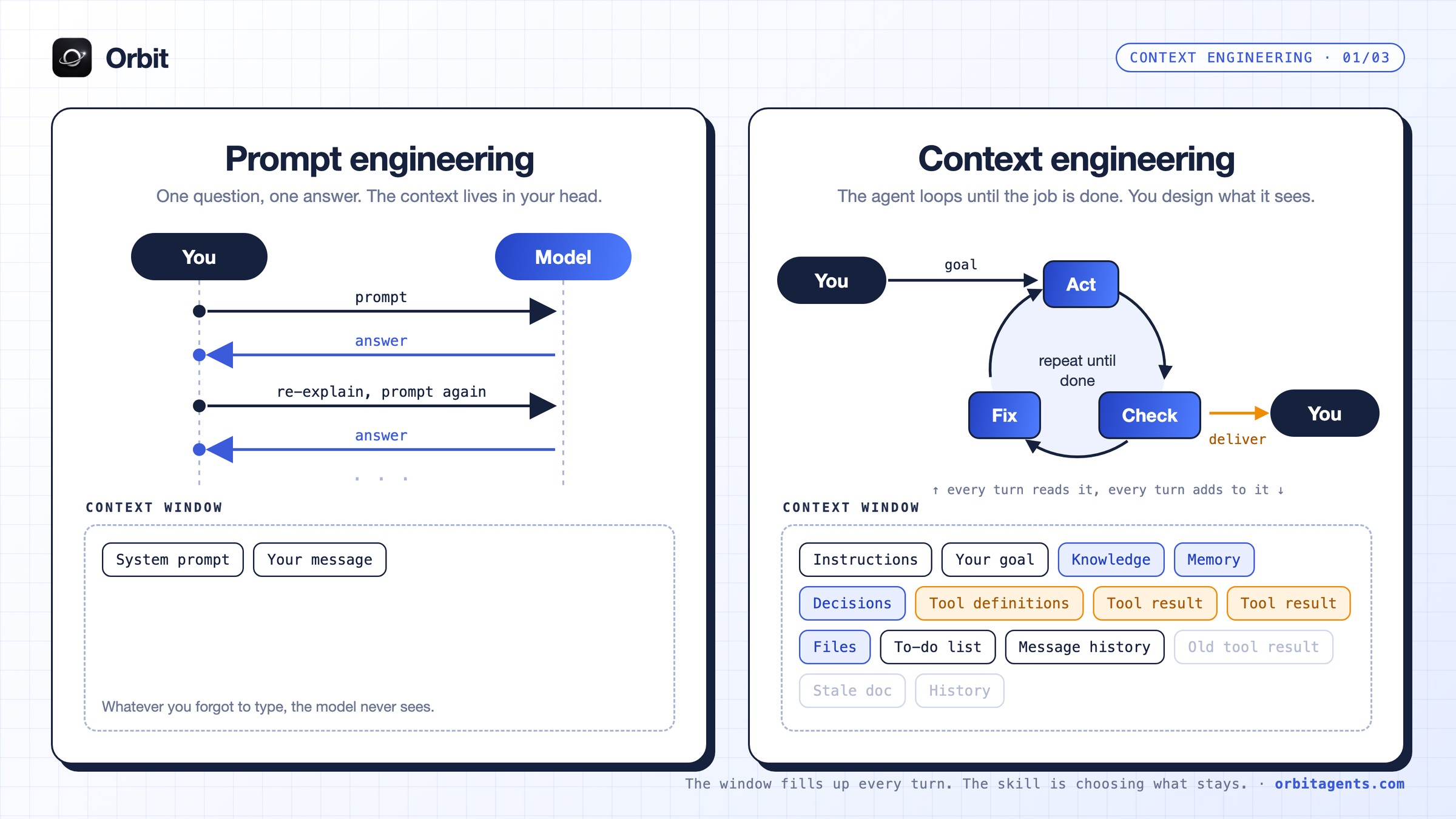
With a chatbot, every turn goes through you. You ask, it answers, you re-explain, it answers again. The only context is the system prompt and whatever you remembered to type.
An agent runs a loop. It acts, checks the result, fixes, and goes again until the job is done. Every turn reads the context window, and every turn adds to it: tool results, files, notes, a to-do list. After twenty steps, most of what's in the window was put there by the agent, not by you.
| Prompt engineering | Context engineering | |
|---|---|---|
| Unit of work | One message | Every step of a loop |
| Main question | How do I phrase this? | What does the model need to see now? |
| Who fills the window | You, by hand | You, your systems and the agent itself |
| Typical failure | Vague answer | Agent forgets a decision, repeats a mistake, contradicts another agent |
| Skill it rewards | Wording | Information design |
| Lives in | A text box | Your memory, tools and data, across every AI tool |
Prompting still matters. It's just one layer of a bigger job now.
Why more context makes agents worse
The obvious move is to dump everything in. Context windows are huge now, so why not paste the whole wiki, every past conversation and all the tool output, and let the model sort it out?
Because models don't read long context evenly. A context window works less like a hard drive and more like a desk. Everything on it competes for attention, the stuff in the middle of a big pile gets overlooked, and every extra page slows the work down and costs money. Researchers and teams building agents in production keep landing on the same four findings:
- Context rot. Chroma tested 18 models in July 2025 and found that performance grows increasingly unreliable as input length grows, even on simple tasks.
- Lost in the middle. A 2023 Stanford study showed models do best when the relevant information sits at the beginning or end of the input, and worse when it's buried in the middle.
- Attention budget. Anthropic describes models as having an "attention budget". Every token you add spends some of it.
- Cost. Manus reports an average input-to-output ratio of about 100:1 in its agent. Context is most of your bill. Their example with Claude Sonnet: cached input at 0.30 USD per million tokens against 3 USD uncached, a 10x difference just from keeping the context stable.
Better context beats more context, every time.
The six layers of context
When people say "context", they usually mean the prompt. In a working agent, the prompt is a small slice of what the model actually reads. The rest comes from your business data, from what happened before, from the tools it can use, and from the trail of its own work in the current run.
It helps to split that into six layers, because each one fails in its own way and needs its own fix. When an agent gets something wrong, the cause almost always traces back to one of these layers being wrong, missing or stale. Here's what each one holds and how it usually breaks:
- Instructions. The job, the rules, the definition of done. Fails when: it's a wall of generic advice the model already follows.
- Knowledge. The facts about your business: pricing, customers, product, voice. Fails when: it's out of date, or two documents disagree.
- Memory. What happened before: decisions made, what worked, what failed. Fails when: it lives in a chat the agent can't see.
- Tools. What the agent can do and how. Fails when: there are 40 overlapping tools and it picks the wrong one.
- State. The to-do list, the files, where it is in the task. Fails when: it loses track halfway through a long run.
- History. Messages and tool results so far. Fails when: old output piles up and pushes the important parts into the middle.
The five moves of context engineering
LangChain groups the strategies into four buckets: write, select, compress and isolate. We add a fifth, because it's becoming the most important one.
1. Write: save it outside the window
Don't make the agent hold everything in its head. Let it write notes, plans and results somewhere it can read back later. Anthropic calls this structured note-taking. Manus uses the file system as "the ultimate context" and has the agent keep rewriting a todo list, so its goals stay at the end of the context where the model pays most attention.
2. Select: pull in only what this step needs
Retrieve just in time. Instead of loading every document up front, give the agent a way to find the right fact when it needs it. The skill is ranking: the most trusted, most relevant, most recent information first.
3. Compress: summarize before it rots
When a run gets long, summarize the history and start the next stretch from the summary. Anthropic calls this compaction. Keep decisions and open problems, drop raw tool output the agent has already used.
4. Isolate: give each job a clean window
Split big work across focused sub-agents, each with its own clean context, and pass back only the result. A research agent doesn't need your outreach templates. Your outreach agent doesn't need 40 pages of research, just the five findings that matter.
5. Subtract: cut what the model already knows
Every new model knows more of the internet. That means a growing share of the context you wrote last year is now pure overhead: "You are an expert copywriter", generic best practices, tone tips it follows anyway.
The rule is simple. If the model already knows it, delete it. If only your business knows it, keep it. Your customers, your numbers, your past decisions, your voice and what already failed. That's the context no model can download.
The golden center: aligned context
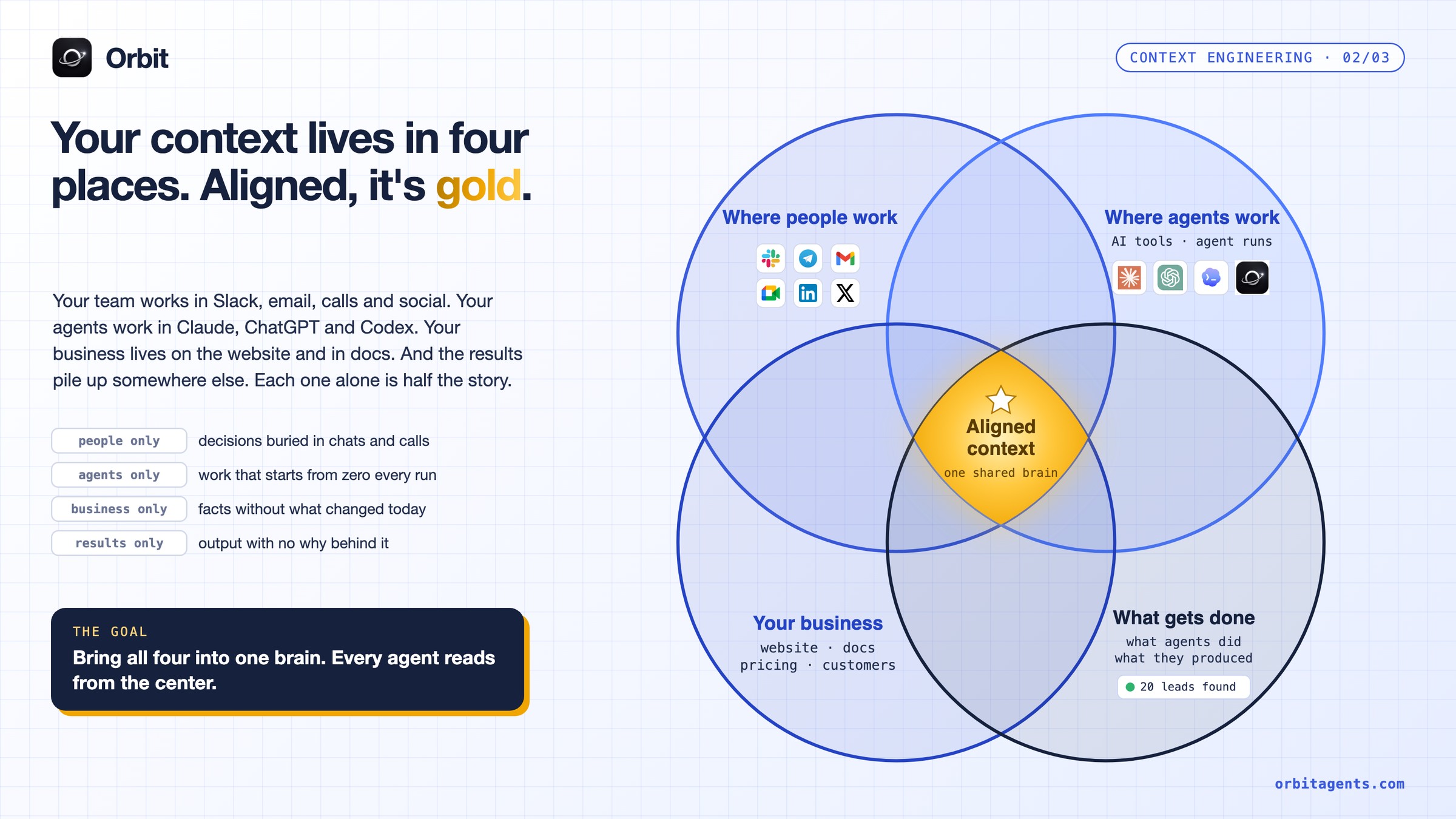
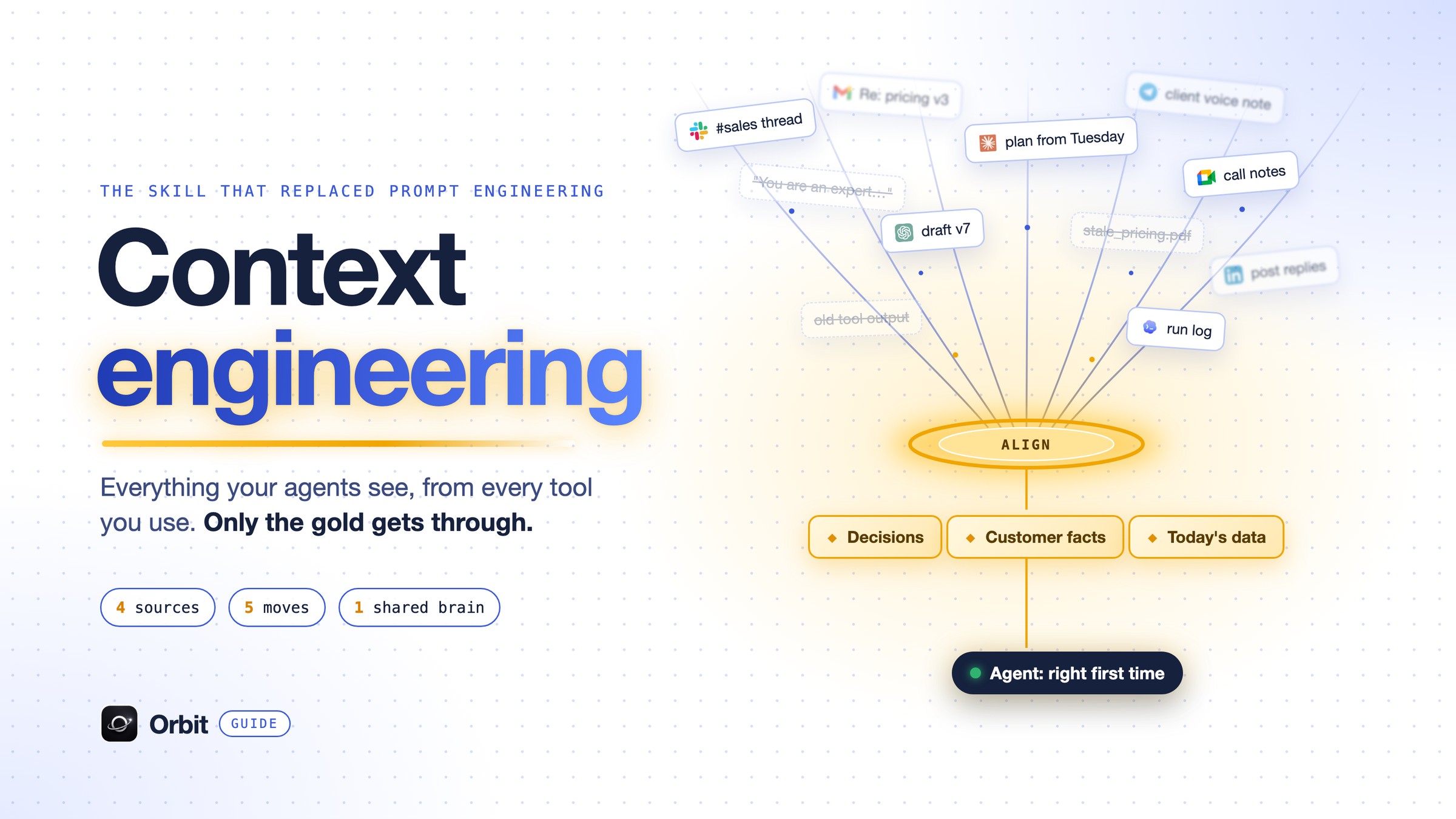
All five moves only work if the agent can reach the right material in the first place. That's harder than it sounds, because the context a business runs on isn't in one place. It's spread across the tools your team talks in, the AI tools your agents run in, the documents that describe the company, and the results that pile up as work gets done.
None of these is wrong on its own. The problem is that each one only sees a piece of the picture, and an agent that reads from just one of them is working with a partial view of your business. In most companies, context lives in four places:
- Where people work. Slack, Telegram, email, meetings, LinkedIn and X. That's where plans get made and decisions get taken.
- Where agents work. Claude, ChatGPT, Codex and your agent runs.
- Your business. The website, docs, pricing, customers and voice.
- What gets done. What each agent did and what it produced: the leads it found, the report it shipped, the step that failed.
Each one alone is half the story. Decisions get buried in chats and calls. Agents start from zero every run. Business docs don't know what changed this morning. Results pile up with no record of why.
Where all four overlap is the golden center: aligned context, the right facts for this job at this moment. That's what every agent should read from.
The hard part: context dies between tools
Here's where most teams get stuck. Claude has its memory. ChatGPT has its own. Codex has a project file. Your agents each have a prompt someone wrote three months ago.
So the same business has five different versions of the truth, and every agent works from whichever one it happens to see. That's how one agent sends a price you changed last week, and another repeats a mistake you already fixed.
Context engineering for one agent is a prompt problem. Context engineering for a company is a shared brain problem.
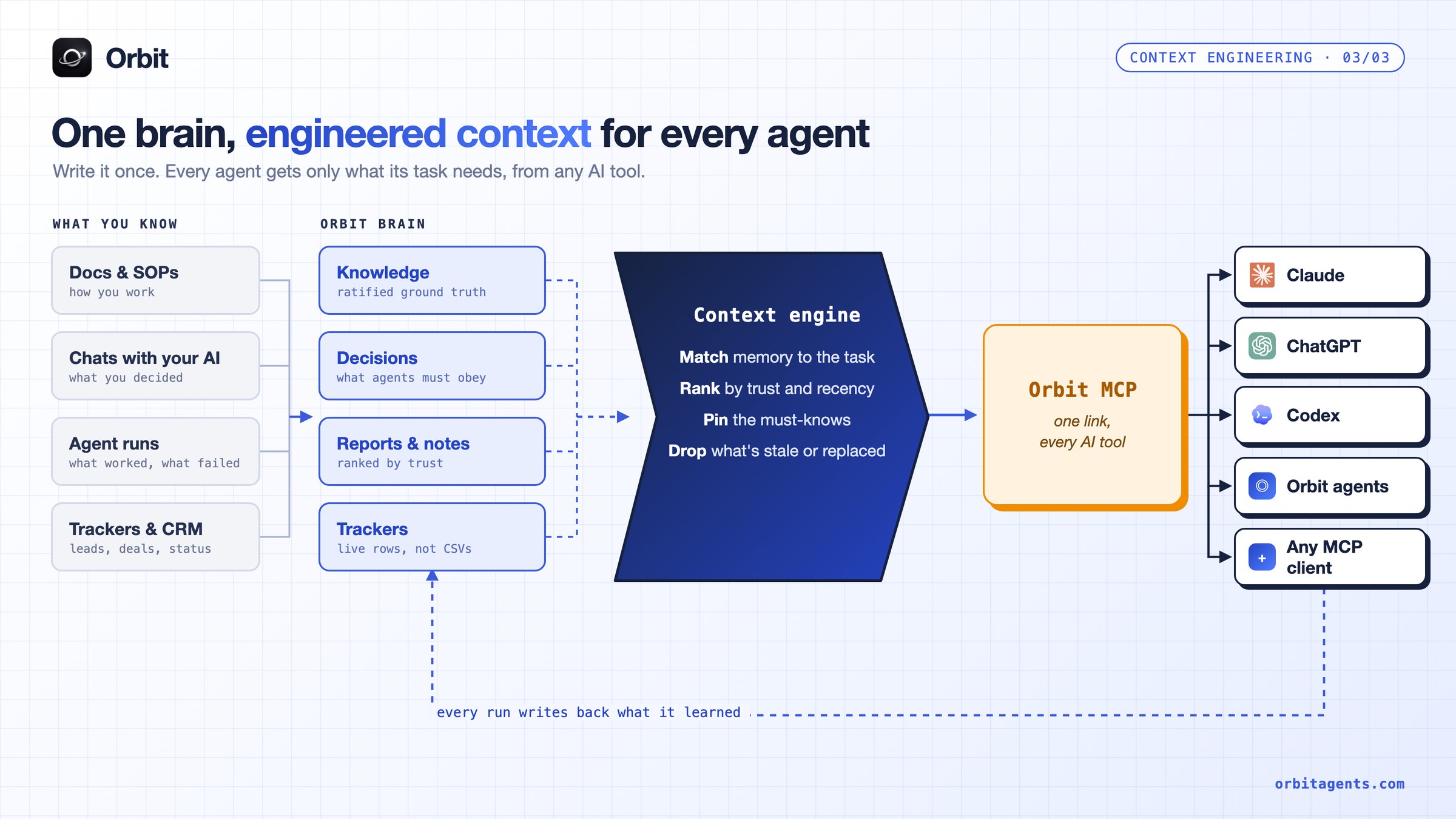
That's the problem we built Orbit to solve. Instead of copying context into every tool and hoping it stays in sync, Orbit keeps one shared brain that every agent and every AI tool reads from and writes back to. The context engineering happens in the middle, so each agent gets the golden center for its task without anyone pasting it in by hand.
In practice, it works like this:
- Write it once. Knowledge, decisions, reports and trackers live in one brain, not in five chat histories.
- Rank by trust. Ratified knowledge outranks a finished report, which outranks a rough note. When a fact is replaced, the old version is archived, not left around to confuse the next run.
- Select per task. When an agent starts a run, it gets the ground truth, the decisions that apply to it, and the few memories most relevant to what it's about to do. Not the whole archive.
- Every tool, one link. The same brain plugs into Claude, ChatGPT, Codex and any MCP client through Model Context Protocol, so context doesn't reset when you switch tools.
- Write back. Every run saves what it learned, so the next agent starts smarter instead of from zero.
If you're running more than one agent, this is the difference between a team and a group of strangers. We wrote more about that in how to manage multiple AI agents as a solo founder, and why notes for you are not the same as memory for agents in our Obsidian comparison.
A context engineering checklist
When an agent gives a bad answer, the reflex is to blame the model or rewrite the prompt. Most of the time the model is fine and the prompt is fine. What's broken is the context around them: a missing decision, a stale document, a pile of old tool output, or a job that should have been split in two.
So before you switch models or start tweaking wording, run through these questions. Each one maps to a layer or a move from above:
- Does the agent know what "done" looks like?
- Is there anything in the instructions the model would do anyway? Cut it.
- Is every business fact coming from one source, or several that disagree?
- Can the agent see the decisions you made last week?
- Does it get only the tools this job needs?
- Does it write notes and a to-do list it can read back?
- On long runs, is the history summarized before it piles up?
- Are separate jobs running in separate, clean contexts?
- Does the result get saved where the next agent will find it?
Most "the AI is dumb" moments are a no somewhere on this list.
The bottom line
Prompt engineering was about talking to a model. Context engineering is about building the world it works in.
The models will keep getting smarter, and they'll keep knowing more of what's public. What they'll never know on their own is your business. Getting that into every agent, at the right moment, in the fewest tokens, is the job now.
Orbit: Build the AI empire that runs with you, the operating system for Claude, Codex, ChatGPT and more. One brain, engineered context for every agent. Start free at orbitagents.com.
Frequently asked questions
- What is context engineering in simple terms?
- It's deciding what an AI model sees before it acts: instructions, business knowledge, memory, tools and the results of its own work. The aim is to give the next step exactly what it needs, and nothing that distracts it.
- Is context engineering replacing prompt engineering?
- It includes it. The prompt is still one layer of the context, but with agents that run many steps, most of what the model reads comes from memory, tools and earlier steps, not from your prompt.
- Why not just use a bigger context window?
- Because models get less reliable as input grows. Chroma found this across 18 models, and earlier research showed facts buried in the middle of long input get missed. Bigger windows also cost more on every step.
- What's the difference between context engineering and RAG?
- RAG (retrieval-augmented generation) is one technique inside context engineering: fetching relevant documents into the window. Context engineering also covers instructions, memory, tool design, compression and how context is split across agents.
- How does Orbit help with context engineering?
- Orbit keeps one shared brain for all your agents and AI tools. Each agent run gets the ratified facts, the decisions that apply to it and the most relevant memories for its task, through one MCP link that works in Claude, ChatGPT, Codex and more. Every run writes back what it learned.
Build your autonomous AI company
Orbit gives your AI clients shared memory, provisioned tools and agents that run like trained employees.
Get started free